Anatomy of Module
Last Updated: February 21st, 2023
How it worked in Divi 4
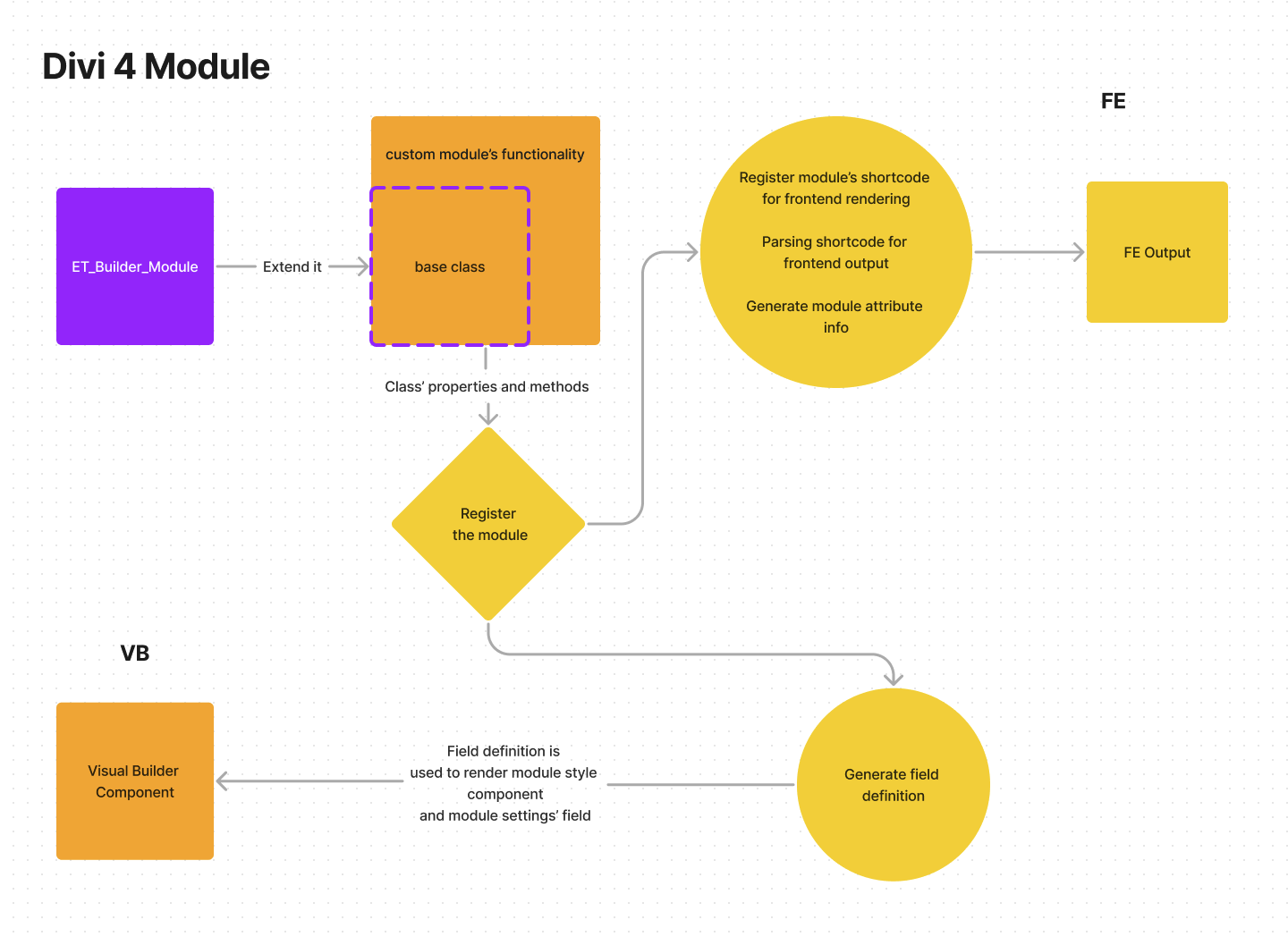
In Divi 4, module is created by extending ET_Builder_Module class then overwrite the class' properties and methods. The class will use these properties and methods to:
- Generate field definition for visual builder
- Register shortcode that is used by the module
- Processsing the shortcode and its attribute
Once you have the PHP side ready, you will need to create a React component for rendering the module in visual builder. You generally only need to add the module's element rendering and custom styles. The advanced option that is declared on module class' properties will be automatically taken care of.
Divi 4 Issues
Divi 4 offers simplicity (to some extent) in declaring module but it gives quite constraint on what third party can do. Third party are only able to reuse component that is currently available by declaring property value to use available component. Good example of this: third party module can declare a field that uses Divi's colorpicker, but can't declare module field that uses custom field component.
In a nutshell, Divi 4 module is basically created using extendability approach.
Visually, it looks like this:
Divi 5 Implementation
As what we have mentioned before, one of Divi 5 focus is extendability. We want to give as much flexibility as possible to third party to create their own module. To achieve this, Divi 5 uses composition approach (more on this below) instead of extendability approach. On top of that, to make it as familiar as possible, we borrow as much concept that we can use from WordPress' block editor whenever it is suitable and adjust it to our end whenever it is needed.
Visually, it looks like this:
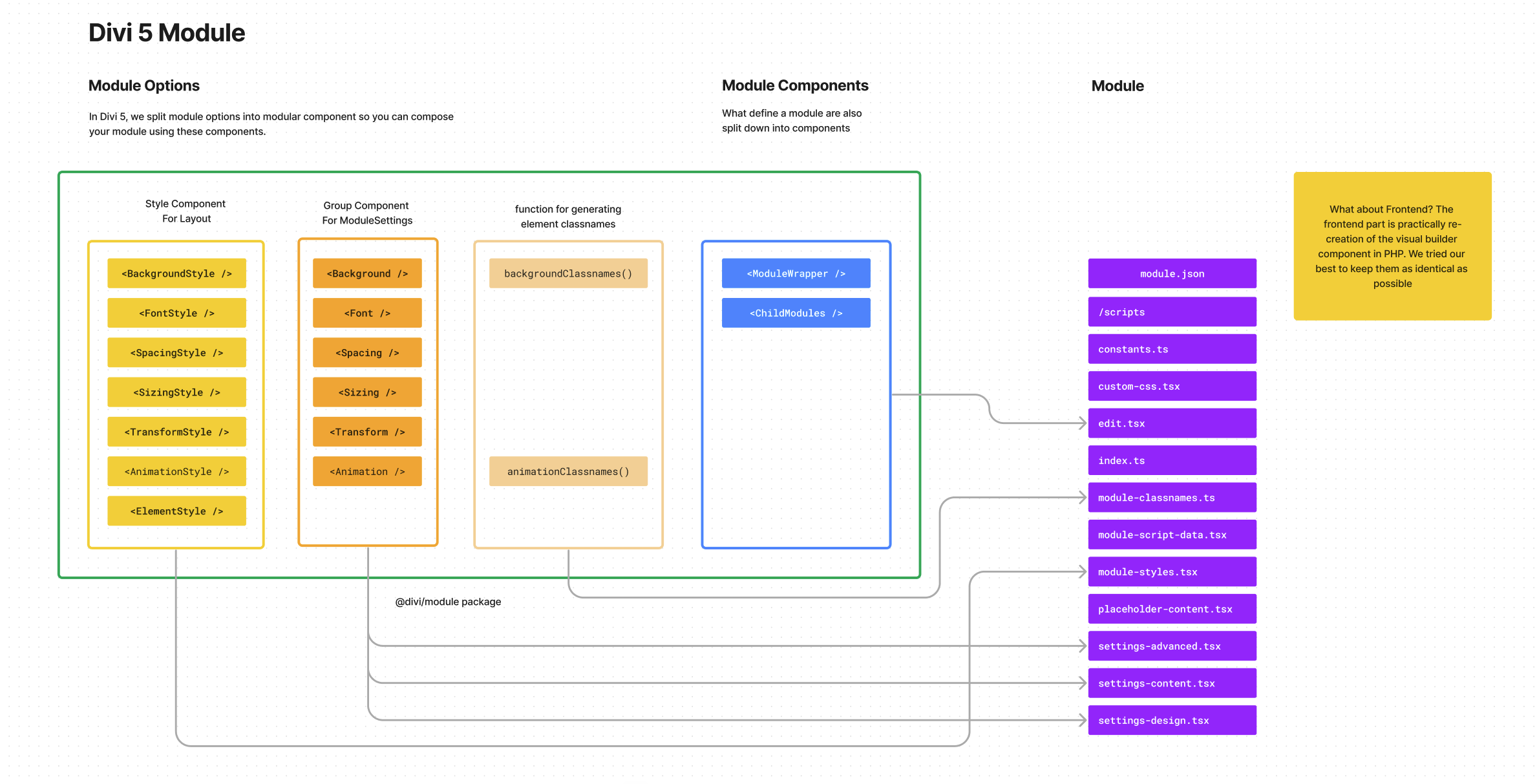
We have created highly annotated module extension example to help you get started with creating your own module.
Core Concept
Technically, Divi 5 module uses the exact same serialized block format as WordPress' own block editor. Divi 5 module also gets rendered using the same block parser that WordPress' block parser has.
Thus, on its simplest sense, Divi 5 module is a WordPress block. It is registered to WordPress block registry, and ultimately in frontend it will be rendered using WordPress' block parser.
Divi 5 Module Is Dynamic Block
While block can be a static or dynamic, given the dynamic nature of Divi, all Divi 5 module is basically a dynamic block (although in visual builder, they don't always being rendered on server side). All of them registers a callback function that will be caled when the block is rendered in frontend. It also register react component that should be used in Visual Builder.
Registering module using module.json
In Block Editor's block, the block's property is stored in block.json file. In Divi 5, the module's property is stored in module.json file. module.json file is basically block editor's block.json plus some Divi-only properties added. The file is basically a JSON file that contains the module's properties. A module is registered to WordPress block registry by passing path to the module.json and additional arguments to ModuleRegistration::register_module() method.
Composing module component
In Divi 4, the only way to take advantage of Divi's robust advanced option is only by adding properties to the extended class so that the option passed via properties will be process by Divi.
In Divi 5, we exposed Divi's component via global variable so that third party can use it to compose:
- Module's setting modal panel
- Module's renderer component
In the PHP side, we try to make the component and structure as close as possible as in its VB counter part.
Folder Structure of
Visual Builder React Component
module-name
├── README.md
├── constants.ts
├── custom-css.ts
├── edit.tsx
├── index.ts
├── module.json
├── module.scss
├── placeholder-content.ts
├── settings-advanced.tsx
├── settings-content.tsx
├── settings-design.tsx
|-- /script
├── style.scss
├── styles.tsx
└── types.ts
Frontend PHP Component
module-name
|-- ModuleName.php
|-- ModuleNameTrait
|   |-- CustomCssTrait.php
|   |-- ModuleClassnameTrait.php
|   |-- ModuleScriptDataTrait.php
|   |-- ModuleStylesTrait.php
|   |-- RenderCallbackTrait.php
Divi 5 Improvements
With this approach, we envision Divi modules to be more flexible and extendable for third party. First, third party module can use the exact same component as the one that is used in Divi's official module. Second, third party can use those component in a way that they see fit, without the constraint of Divi core's implementation. Third, third party can create their own component and use it in their module (either in layout or in module settings).
Current Implementation Limitation
So far, we've been focusing on (re)building components that are needed for modules. The compose-based approach works really well for composing a module. The cons of this is with that much of a flexibility, you are fully responsible in arranging them.
An easy way to understand it, consider that in Divi 4: what you need to be worry of is configuring module property in the module class. Once this is set up, the field definition will be generated and attibute is automatically handled and parsed.
In Divi 5, you need to compose the module component (in PHP and react) yourself. This is a bit more work, but it gives you more flexibility.
This being said: we are continuously figuring out a way to find better composing module. We think there should be even simpler way (maybe with stricter flexibility) to create a module if user wish to.
Got a question or feedback? Ask away!